Power planning for a standing desk, fully loaded desk
Quick answer
A standing desk, fully loaded desk draws roughly 408 W and needs about 10 outlets, so plan on 12 to leave room. That is 28 percent of a single 15 A branch circuit derated to 80 percent, and a UPS would need about 680 VA to carry it.
The circuit arithmetic and the UPS power factor are standard. Device draws are planning conventions, and the label on your own equipment is the real figure.
| Figure | Value | Note |
|---|---|---|
| Total draw | 408 W | Typical, not peak |
| Devices to plug in | 10 | Plan two spare outlets beyond this |
| Share of one 15 A circuit | 28% | Of 1440 W continuous |
| UPS size | 680 VA | Watts divided by a 0.6 power factor |
| Surge rating band | 2500 to 4000 J | A desk holding equipment worth protecting properly, or an area with frequent storms. |
| Item | Sizing | Why |
|---|---|---|
| Cable tray length | 32 to 42 in | Holds the strip and the slack |
| Power strip outlets | 12 | Spares are always used |
| Cable slack for a sit stand desk | +16 in per run | The desk travels, and the cable has to as well |
| Grommet or pass through | Two | Keeps runs off the floor |
Power and cable hardware for this desk
Shown across the range this category actually spans, from $8.99 to $294.99, rather than the cheapest few.
- Wrap-It Storage
Wrap-It Storage Zipper Cable Sleeve, Black, 24", 4-Pack
$18.99 Check pricePrices change often - LOVJOYSE
Cable Management, 25.3'' Under Desk Cable Management Tray No Drill
$23.99 Check pricePrices change often - Anker
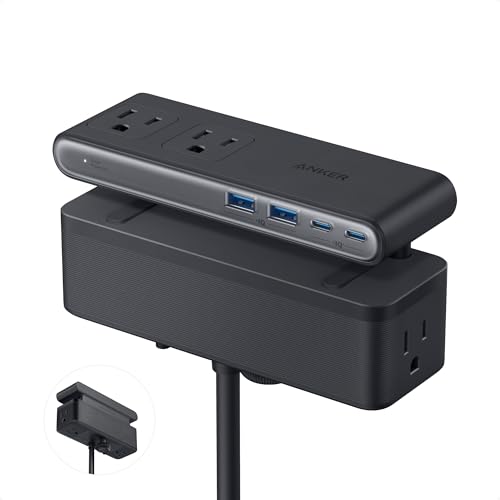
Anker Nano Power Strip, Desk Clamp, 70W Max, 1500J Surge Protector, 2 USB C
$69.99 Check pricePrices change often - TRIPP LITE
Eaton Tripp Lite SMART1500LCD 1500VA 2U Rack Mount UPS 900W Battery Backup
$294.99 Check pricePrices change often



The circuit is almost never the limit
A 15 A, 120 V branch circuit carries 15 x 120 = 1800 W, and the continuous rating is 80 percent of that, so 1440 W. This desk draws about 408 W, which is 28 percent of it. Even with a generous allowance for peaks, there is a great deal of headroom.
The real constraints are outlet count and cable management. 10 devices need 10 outlets, and a standard wall receptacle gives you two, which is why a desk ends up with a strip under it. Specify the strip with spares: every desk acquires devices, and a strip with no free outlet is what leads to the daisy chaining that manufacturers warn against.
Surge protection is a consumable
A surge protector works by absorbing energy in metal oxide varistors, and those degrade a little with every event they take. After enough of them the unit passes power through while protecting nothing, and the light on the front will usually still be on, because on many units that light indicates power rather than protection. Only a unit with a genuine protection status indicator tells you the difference.
For this load a rating of 2500 to 4000 J suits, which is a desk holding equipment worth protecting properly, or an area with frequent storms. A higher rating buys more events absorbed rather than a higher grade of protection, so it is worth the small premium on a desk holding equipment you care about. At this draw a UPS also starts to make sense, both for ride through during a brief cut and because a desktop losing power mid write is the scenario that costs you work.
Questions people ask
How many outlets does a standing desk, fully loaded desk need?
About 10 for the equipment itself, so specify 12 to leave spares. Desks reliably acquire devices over time, and running out of outlets is what leads people to daisy chain strips together, which every manufacturer warns against and which is a genuine fire risk rather than a formality.
Will this overload a normal circuit?
No. A 15 A, 120 V circuit carries 1440 W continuously once derated to 80 percent, and this setup draws around 408 W, which is 28 percent of it. What does overload a circuit is adding a space heater or a laser printer to the same one, since either can draw well over 1,000 W on its own.
What surge protector rating should I buy?
Something in the 2500 to 4000 J band for this load. Joules measure how much total energy the unit can absorb before it is used up, so a higher number means more events survived rather than stronger protection per event. Look for a protection status indicator, because the power light on most units keeps glowing long after the protection has gone.
Do I need a UPS at this desk?
A UPS sized around 680 VA would cover this load, using the usual conversion of watts divided by a 0.6 power factor. At this draw it is worth having: it rides through brief cuts and gives a desktop time to shut down cleanly instead of losing work in progress.