Best Cable Management
Quick answer
The Univivi 36 Inch No Drill Cable Tray ($39.99) is the top pick for a sit stand desk since it hides the longest cable runs and travels with the desk as it moves. A pack of desk grommets ($9.19) is the cheapest starting point for routing cables through the desktop itself.
Researched from manufacturer specifications and verified owner reviews. Not independently tested in person.
Cable clutter under a desk is not just visual, it is also how power strips end up daisy chained and cables end up pinched or snagged on a moving desk. The Under Desk Cable Management Tray, No Drill, Metal Mesh ($13.99) is the workhorse pick here because it gathers every cable running to the desk into one open channel that is easy to inspect, which matters more than it sounds like it should, since a hidden cable is a cable nobody checks for damage.

Under Desk Cable Management Tray No Drill, Metal Mesh Cable Management Under Desk with Clamp Mount, 2 Hole Cable Tray with Wire Management and Cord Organizer for Home Office Standing Desk
A metal mesh tray that clamps under the desk with no drilling gathers every cable into one visible, ventilated channel, which owner reviews describe as easy to install in minutes and easy to inspect later.
The three tiers
Desk Grommet & Cable Grommet 2 Inch (10 Pack) - Black Desk Hole Cover with Hole Saw - Cable Management Kit for Office, TV Stand, Workstation - Hide Wires Behind Wall, Cable Pass Through (50mm)
A 10 pack of desk grommets routes cables through clean holes in the desktop itself for under $10, which is the cheapest way to stop cables draping over the front edge of the desk.
The trade off: Grommets require cutting or already having a hole in the desktop, and they do nothing to organize the tangle of cables once they are below the desk.

Under Desk Cable Management Tray No Drill, Metal Mesh Cable Management Under Desk with Clamp Mount, 2 Hole Cable Tray with Wire Management and Cord Organizer for Home Office Standing Desk
A no drill metal mesh tray mounts under the desk with clamps and gathers power cables, chargers, and hubs into one open channel that keeps them off the floor.
The trade off: A mesh tray is open, not fully enclosed, so it tidies cables rather than hiding them completely from view when looking up under the desk.
Univivi No Drill Under Desk Cable Management Tray, 36 inch Cable Management
The Univivi 36 inch tray is long enough to span a full size desk and carries the added slack a sit stand desk needs as it changes height, which shorter trays cannot manage on their own.
The trade off: A tray this long needs a desk wide enough to mount it without hitting drawers, a modesty panel, or floor level furniture underneath.
Who should not buy it: A small or narrow desk, where a shorter tray or a bundle of cable sleeves accomplishes the same organization without the extra length.
- Ceiling
Univivi No Drill Under Desk Cable Management Tray, 36 inch Cable Management
$39.99 Check pricePrices change often

How we chose
We did not test these cable management products in person. Every claim here comes from the manufacturer specification sheet, the product listing, and a read of verified owner reviews.
We picked one product from each of the main cable management approaches, grommets for routing through the desktop, a tray for gathering cables underneath, and a longer tray for sit stand desks, rather than three variations on the same product, since the right approach depends more on desk type than on price alone.
What is the actual goal of cable management?
Cable management is not only about appearance. Loose cables under a desk can get caught in a reclining chair, pulled taut and damaged when a sit stand desk rises, or hidden long enough that a fraying cord goes unnoticed. Organizing cables into a tray or sleeve keeps them visible for a quick check and keeps them clear of moving desk parts and chair wheels.
A cable tray, a set of sleeves, and a set of grommets solve different parts of the problem: grommets control where cables cross the desktop surface, sleeves bundle multiple cables into one manageable run, and a tray gathers everything into one place under the desk.
Grommets, sleeves, or a tray: which do I need first?
If cables are draping over the front or back edge of the desk and catching on legs or a chair, grommets that route them through the desktop are the first fix, and they are the least expensive item in this category. If several cables run together from the desk to the wall, a fabric or zippered sleeve bundles them into one neat run instead of a loose tangle. If the real problem is a pile of chargers, hubs, and power strips visible under the desk, a tray is the fix that actually organizes rather than just bundles.
Most desks eventually use some combination of all three, since they address different points along the cable path from device to outlet.
| Product | Price | Solves | Best for |
|---|---|---|---|
| Desk Grommet 2 Inch, 10 pack | $9.19 | Cables crossing the desktop edge | Routing through a hole in the desk |
| Under Desk Tray, Metal Mesh | $13.99 | Loose cables and power strips underneath | Gathering everything into one channel |
| Univivi 36 Inch Tray | $39.99 | Long runs on a wide or sit stand desk | Desks that move or span a large width |
How much extra cable length does a sit stand desk need?
A sit stand desk changes height throughout the day, and every cable running from the desktop to the wall or floor needs enough slack to follow that motion without pulling taut at full height or bunching up at the lowest setting. Published guidance on sit stand cable routing puts that extra allowance at roughly 16 inches of slack per cable run. A cable tray mounted under the desk, rather than fixed to the wall, is what lets that extra length move with the desk instead of catching on the frame.
Skipping this step is a common reason a sit stand desk motor strains or a cable disconnects partway through its travel range.
Is it safe to bundle a power cable with other cables?
Bundling a power cable together with low voltage data cables like ethernet or USB inside the same sleeve is generally fine for home office loads, since desk level power draw is far below anything that would cause meaningful interference or heat buildup in a short bundle. What is not safe is running a power strip cable into another power strip, known as daisy chaining, which can overload the rated capacity of the first strip and is explicitly against most surge protector manufacturer instructions. Cable management is about routing, and it is not a substitute for correct outlet planning.
Do cable trays interfere with a keyboard tray or CPU holder?
It depends on mounting position. A cable tray mounted toward the back of the desk, closer to the wall, generally clears a keyboard tray mounted toward the front where the user sits. A CPU holder that hangs from the underside of the desk needs its own clearance check, since a wide cable tray and a CPU holder can compete for the same under desk space on a narrow desk. Measuring the desk depth and sketching rough positions before ordering multiple accessories avoids a clearance conflict after the fact.
Power up a tidy desk
Shown across the range this category actually spans, from $8.99 to $69.99, rather than the cheapest few.
- Wrap-It Storage
Wrap-It Storage Zipper Cable Sleeve, Black, 24", 4-Pack
$18.99 Check pricePrices change often - Wrap-It Storage
Wrap-It Storage Hook and Loop Cable Sleeve, Black, 48", 2-Pack
$23.99 Check pricePrices change often - JXGUCAT
Desk Clamp Power Strip 10FT, 40W Total Fast Charging Station, Black
$26.99 Check pricePrices change often - Anker
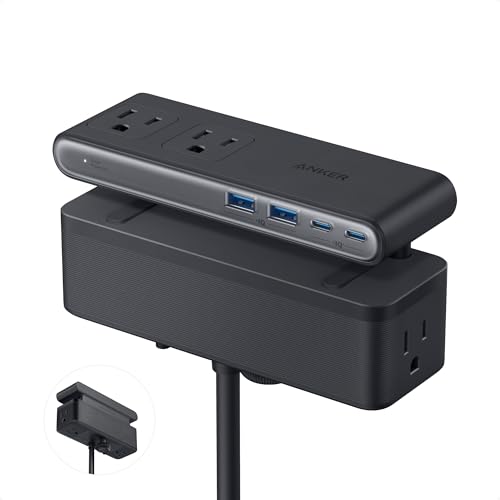
Anker Nano Power Strip, Desk Clamp, 70W Max, 1500J Surge Protector, 2 USB C
$69.99 Check pricePrices change often


Buying tips
- Measure the desk width before ordering a long tray; a tray that is too long for the desk has nowhere correct to clamp.
- Check the clamp or screw mount type against the desktop thickness the same way you would for a keyboard tray.
- Leave slack, not tension, in every cable that reaches a sit stand desk, roughly 16 inches per run, so the desk can travel its full range without pulling a cable loose.
Get the desk setup checklist
One page: the measurements to take, the order to set them in, and the numbers to check against. Free, no spam.
The mailing list opens shortly. Every measurement it covers is already on this site, in the calculators and the fit tables, at no cost and with no address required.
Questions people ask
Is a cable tray or a cable sleeve better?
They solve different problems and often work together. A cable tray gathers loose items, power strips, chargers, and hubs, into one open channel under the desk. A cable sleeve bundles several individual cables into one wrapped run, which is more about tidiness along a cable path than about holding devices. A desk with several devices under it usually benefits from a tray, while a desk that just needs a few cables bundled together toward the wall benefits more from a sleeve.
Do I need to drill into my desk for a cable tray?
No. The trays covered here use a no drill clamp mount that grips the underside of the desktop, which works on most solid desks and does not leave permanent holes. This matters for rented spaces or desks the owner does not want to modify. Always check the clamp thickness range against the actual desktop before buying, since a very thick or very thin desktop can fall outside some clamp ranges.
Will a metal cable tray cause any electrical issues?
No. A cable tray is a passive organizing shelf, not part of the electrical circuit, and standard home office cables are insulated and rated for routing together in a shared channel. The one electrical rule that matters regardless of tray choice is never plugging one power strip into another, known as daisy chaining, since that can exceed the rated capacity of the first strip.
How many desk grommets do I need?
One grommet per cable bundle passing through the desktop is typical, so a desk with a monitor, a lamp, and a charger routed through one hole might only need a single larger grommet, while a desk with several separate pass through points needs one grommet per point. A 10 pack covers most single desk setups with room to spare for a second desk or a future addition.
Can cable management help a sit stand desk motor last longer?
Indirectly, yes. A cable that is pulled taut at full desk height puts repeated strain on its connector and can eventually work loose or fray, and a cable that is not managed at all can catch on the desk frame during travel, which puts mechanical stress on both the cable and the desk mechanism. Routing cables through a tray that moves with the desk, with enough slack for the full height range, reduces both of those risks over years of daily raising and lowering.
Do cable sleeves work with thick cables like monitor power cords?
Most fabric and split tubing sleeves are rated for a range of cable diameters and can bundle a monitor power cord together with thinner cables like USB or ethernet, as long as the combined bundle fits within the sleeve diameter listed on the product. Checking the rated diameter of the sleeve against the total bundle thickness before buying avoids ordering a sleeve that is too tight to close around a stiff power cord.