Home Office Lighting Guide
Quick answer
Eye strain from a monitor is driven more by the contrast between the screen and the surrounding room than by screen brightness alone, so a bias light behind the monitor that raises the ambient level near the screen is a widely used fix, though it is a convention rather than a single published standard. A task lamp for reading and paperwork should sit to the side, not directly behind, so it does not add glare to the screen itself.
There is no single named lighting standard in this guide; the layering approach below (ambient plus bias plus task light) is a widely used convention for reducing screen-to-room contrast, distinct from the published posture and desk standards covered elsewhere on the site.
Home office lighting rarely gets the same attention as chair or desk shopping, but a mismatched light setup is one of the more common causes of end-of-day eye fatigue. The core idea worth understanding is contrast, not brightness: a screen glowing in an otherwise dark room forces your eyes to constantly readjust between the bright display and the dim surroundings, and that constant readjustment is more tiring than either being bright or being dim on its own. This guide covers how to layer ambient, bias and task lighting to reduce that contrast without introducing glare on the screen.
Why does screen contrast matter more than screen brightness?
Your eyes adapt to whatever the dominant light level in your field of view happens to be. If a monitor is the brightest object in an otherwise dim room, your pupils are constantly adjusting between the screen and the darker periphery every time your gaze shifts, which is the mechanism behind a lot of reported evening eye strain. Raising the ambient light level around the screen, rather than lowering screen brightness alone, closes that gap.
This is why a bright monitor in a bright room can feel more comfortable over a full day than the same monitor dimmed down in a dark room: the absolute brightness matters less than how far the screen sits from the light level of everything around it.
| Room condition | Screen-to-room contrast | Typical experience |
|---|---|---|
| Dark room, no bias light | High | Frequent pupil adjustment, more reported strain |
| Dark room with bias light | Reduced | Softer edge around the screen |
| Well-lit room, daytime | Low | Screen and surroundings closer in level |
Bias lights for the monitor
Shown across the range this category actually spans, from $11.99 to $19.99, rather than the cheapest few.
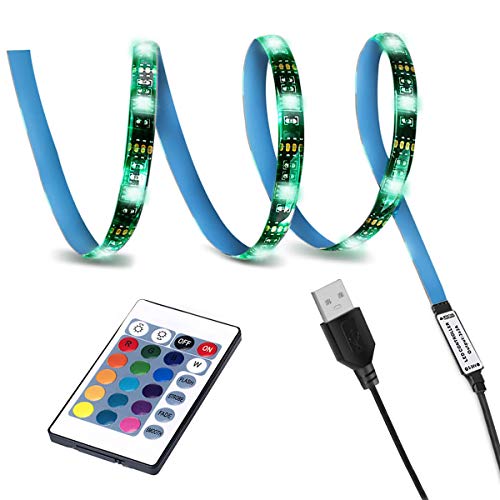
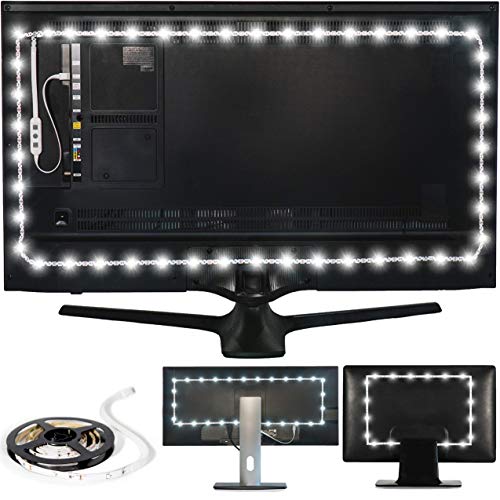
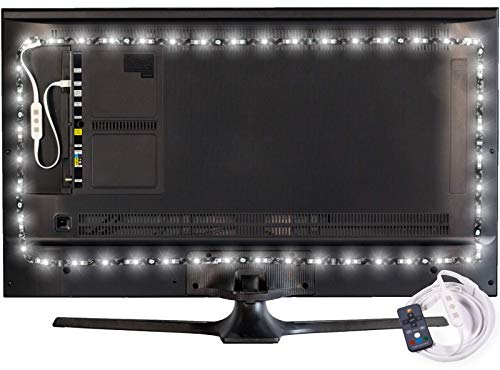
What is a bias light and what does it actually fix?
A bias light is a thin LED strip mounted behind the monitor, usually pointed at the wall rather than at your eyes, that adds a soft glow around the edges of the screen without adding glare on the screen surface itself. It directly targets the contrast problem described above by raising the light level immediately surrounding the display, which is the area your peripheral vision compares the screen against most often.
Most bias lights are USB powered, drawing a small enough load that it does not meaningfully affect the desk power budget covered in the cable management guide, and many offer adjustable color temperature so the glow can be matched to the color temperature of the monitor itself rather than clashing against it.
Desk lamps and light bars
Shown across the range this category actually spans, from $20.98 to $46.48, rather than the cheapest few.
- Airlonv
Airlonv LED Desk Lamp with Clamp, 17" Stepless Dimming Light, Black
$20.98 Check pricePrices change often - Miritz
Miritz Computer Screen Lamp, Made of Aluminum Alloy, Office and Home Use
$24.99 Check pricePrices change often - Colorpanda
16.14" Monitor Light Bar,250LM USB LED Desk Lamp,Home Office Gaming
$27.99 Check pricePrices change often

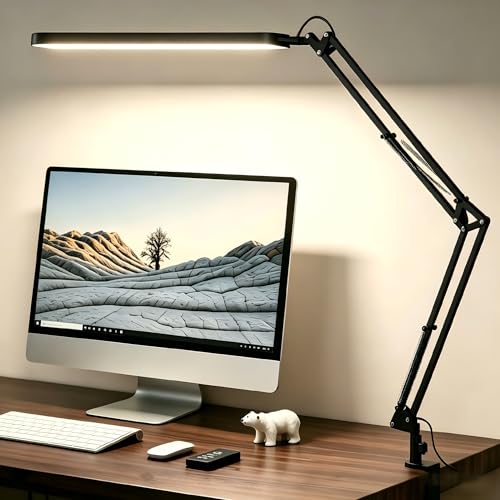


Where should a task lamp go relative to the monitor?
A task lamp for reading documents, notes or a keyboard should sit to the side of the monitor, ideally on the non-dominant hand side for right-handed users so the lamp does not cast a shadow from your writing hand, and angled down onto the work surface rather than up toward your eyes or directly at the screen. A lamp placed behind or above the monitor risks reflecting off the glass and adding glare exactly where the bias light is trying to remove contrast.
Clamp-mounted lamps that attach to the desk edge free up desk surface compared to a base-mounted lamp, which matters more on smaller desks where every inch of surface is already contested by keyboard, mouse and monitor arm clearance.
| Fixture | Primary role | Placement |
|---|---|---|
| Bias light | Reduce screen-to-room contrast | Behind monitor, aimed at wall |
| Desk lamp | Task lighting for reading and writing | Side of desk, angled down |
| Floor lamp | General ambient room light | Corner or behind seating position |
| Light bar | Task lighting without desk footprint | Mounted on top of monitor, aimed down at desk |
Ambient floor lamps
Shown across the range this category actually spans, from $26.97 to $43.99, rather than the cheapest few.
- Ambimall
Ambimall 64" Modern Floor Lamp with Remote Control, 9W Bulb Included
$26.97 Check pricePrices change often - SUNMORY
SUNMORY Floor Lamps for Living Room, LED Standing Lamp with Remote Control
$43.99 Check pricePrices change often


What does a monitor light bar do differently from a desk lamp?
A monitor light bar clips to the top edge of the display and angles downward onto the desk surface below, lighting the keyboard and desk area without adding a base or clamp footprint anywhere on the desk itself. Because it mounts above and angles down rather than sitting at desk level, it is less likely to create glare on the screen than a poorly aimed desk lamp, provided it is genuinely angled down and not tilted back toward the user's eyes.
This makes a light bar a reasonable choice on desks that are already tight on surface space, particularly the small-footprint desks covered in the small space home office guide, where a clamp lamp base competes directly with keyboard and mouse room.
How much ambient light does a home office actually need?
General room lighting from an overhead fixture or a floor lamp sets the baseline the bias light and task light are layered on top of. A dim room with no ambient source forces the bias light and task lamp to do all the contrast-reduction work alone, while a room with reasonable overhead or floor lighting needs less from the desk-level fixtures to close the screen-to-room gap.
A floor lamp positioned behind or to the side of the seating position, rather than directly facing the user, adds ambient light without contributing to screen glare, which is a straightforward way to raise the general light level in a home office that otherwise relies only on a single overhead fixture.
How does natural light and window placement affect glare?
A desk facing directly toward a window puts a bright light source right behind the monitor from the user's perspective, which recreates the same screen-versus-surroundings contrast problem in reverse, since the eye now has to adjust between a bright window and a comparatively dim screen. A desk facing away from a window, with the monitor between the user and the window, risks the opposite problem of glare reflecting directly off the screen surface.
A desk positioned perpendicular to the main window, so natural light comes from the side rather than the front or back, generally avoids both problems and is the layout worth trying first before adding artificial fixtures to compensate for a difficult window position.
Do color temperature and dimming actually matter through the day?
Warmer color temperatures in the evening and cooler, more neutral temperatures during working hours is a common convention tied to matching light color to time of day, though this guide makes no claim about sleep or health outcomes from that practice, only that many desk lamps and bias lights include adjustable temperature specifically to support it. Dimmable fixtures let you match the overall light level to the natural light already in the room rather than running at a fixed brightness regardless of the time of day.
Get the desk setup checklist
One page: the measurements to take, the order to set them in, and the numbers to check against. Free, no spam.
The mailing list opens shortly. Every measurement it covers is already on this site, in the calculators and the fit tables, at no cost and with no address required.
Questions people ask
Will a bias light actually reduce eye strain?
A bias light addresses one contributing factor, the contrast between a bright screen and a dark surrounding area, by raising the ambient light immediately around the monitor. This is a widely used approach rather than a claim this guide can verify for any individual, and it does not replace other factors in eye comfort such as screen distance, text size or blink frequency, which are separate topics from lighting alone.
Should my desk lamp point at my keyboard or my monitor?
At your keyboard, desk surface and any paperwork, never at the monitor. Light aimed at the screen itself washes out contrast on the display and can create glare or reflections that make the screen harder to read, which works against the goal of reducing eye strain rather than helping it.
Is a light bar better than a bias light?
They solve different problems. A light bar is task lighting for the desk surface below the monitor; a bias light is ambient lighting behind the monitor to reduce screen-to-room contrast. Many home offices benefit from both together rather than choosing one over the other, since they address different areas of the visual field.
Does working near a bright window remove the need for a bias light?
It can reduce the need during daylight hours if the window light reaches the wall behind the monitor at a similar level to the screen, but it does nothing after dark or on overcast days, and a window directly behind the monitor can introduce its own glare problem. A bias light remains useful as a consistent source that does not depend on time of day or weather.
What color temperature should I use for a home office lamp?
There is no single correct number, and this is a matter of personal preference and convention rather than a published requirement. A neutral to cool white in the 4000 to 5000 kelvin range is a common starting point for daytime task lighting, with many adjustable lamps allowing a shift toward warmer tones later in the day if preferred.
Can too much ambient light cause its own problems?
Yes, an overly bright room can wash out screen contrast in the other direction, making the display look dim by comparison and prompting you to raise screen brightness higher than needed, which can itself contribute to strain over a full day. The goal is a rough balance between the screen and its surroundings, not maximizing brightness on either side.